
What Is IPTV? Complete Guide to Internet Protocol Television (2026)
IPTV streaming experts with 5+ years of hands-on experience testing IPTV players, apps, and services across Android, iOS, Firestick, and Smart TV platforms.
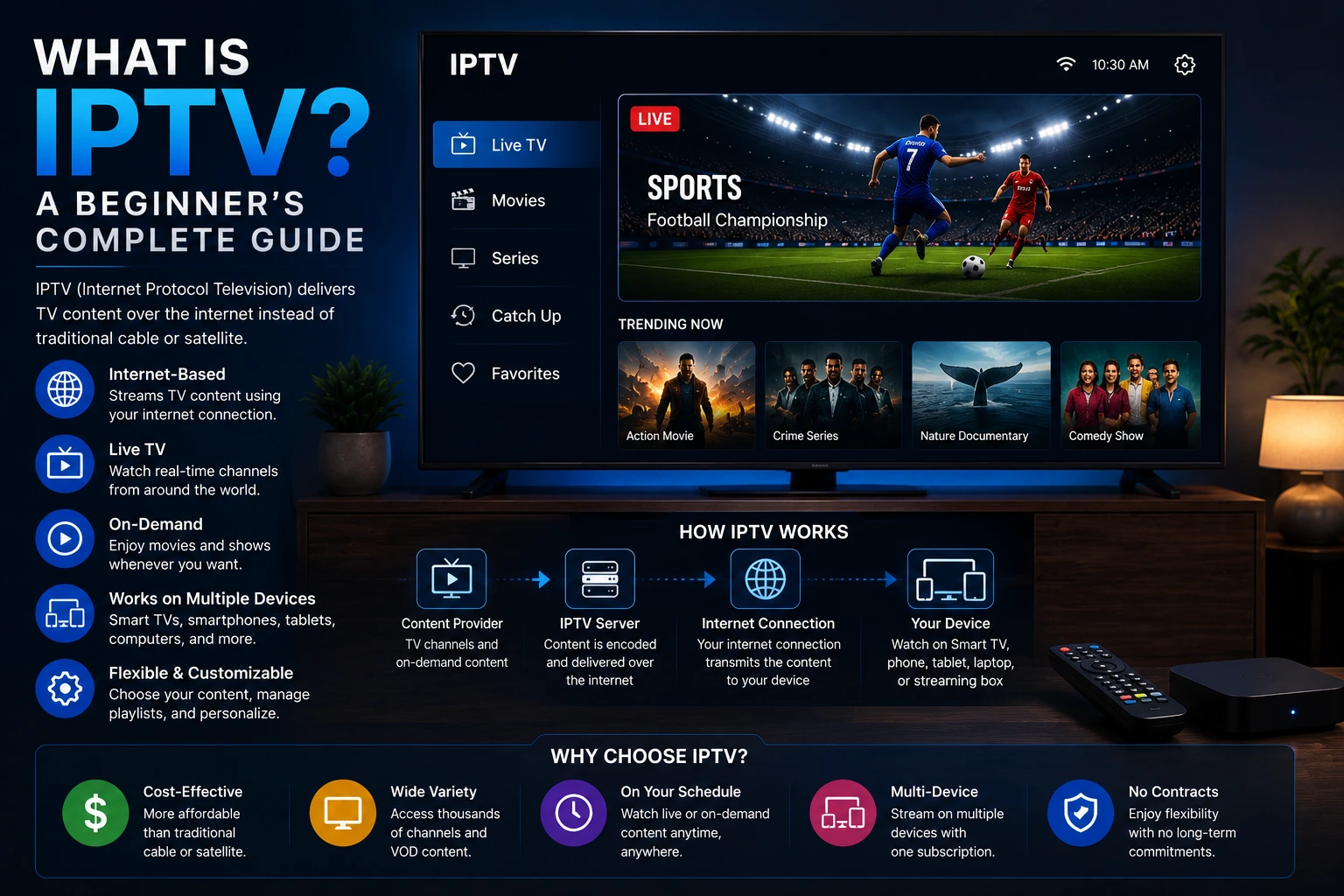
IPTV (Internet Protocol Television) is a system that delivers television content over the internet instead of traditional cable, satellite, or terrestrial broadcast. Unlike streaming services like Netflix that offer on-demand content, IPTV can deliver live TV channels with features like pause, rewind, and program guides. IPTV Smarters Pro is an IPTV player that lets you watch IPTV on any device.
In This Article
Internet Protocol Television (IPTV) has transformed how millions of people watch television worldwide. Instead of relying on cable infrastructure or satellite dishes, IPTV delivers TV channels and on-demand content through your internet connection. This technology has grown rapidly because it offers more channels at lower prices than traditional cable, while giving viewers the flexibility to watch on any device. Unlike streaming services like Netflix that only offer on-demand content, IPTV combines live television with on-demand libraries in a single platform. This guide explains everything you need to know about IPTV — how it works, the different types available, what equipment you need, and how to get started with the best IPTV player on the market.
How Does IPTV Work?
Traditional television broadcasts all channels simultaneously, and your TV tuner selects which signal to display. IPTV works differently: it sends only the channel you select over the internet using IP packets. When you change channels, your device requests a new stream from the provider server. This on-demand delivery system is more efficient because it only uses bandwidth for the content you are actually watching. It also enables advanced features like pause, rewind, fast-forward, and catch-up TV that traditional broadcast television cannot offer. The technology relies on a stable internet connection, with a recommended speed of at least 10 Mbps for HD content and 25 Mbps for 4K streaming.
What Types of IPTV Services Are Available?
Live Television
Live IPTV streams broadcast channels in real time, similar to traditional TV. This includes news, sports, entertainment, and international channels. IPTV Smarters Pro organizes live channels with an EPG so you can see program schedules.

Video on Demand (VOD)
VOD lets you choose movies and TV shows from a library and watch them immediately. Unlike live TV, you control when content plays, pause, rewind, and fast-forward just like Netflix or Amazon Prime.

Timeshift and Catch-Up TV
Timeshift allows you to pause and rewind live TV. Catch-up TV lets you watch programs that aired in the past 24-72 hours. These features give you flexibility even when watching live broadcasts.
Series and Recording
Many IPTV providers organize TV series with all episodes available on demand. Some providers offer cloud-based recording so you can save live programs to watch later.
What Do You Need for IPTV?
- Internet connection — At least 10 Mbps for HD, 25 Mbps for 4K
- IPTV player app — Like IPTV Smarters Pro, available on all major platforms
- IPTV subscription — From a service provider who supplies the channel streams
- Supported device — Android TV, Firestick, Smart TV, phone, tablet, or computer
Internet Speed Matters
How Does IPTV Compare to Cable and Streaming Services?
| Feature | IPTV | Cable TV | Streaming (Netflix) |
|---|---|---|---|
| Live TV channels | Thousands | 100-500 | None |
| On-demand library | Yes | Limited | Yes |
| Device flexibility | Any device | TV only | Any device |
| Monthly cost | $10-20 | $100+ | $10-25 |
| Pause/rewind live TV | Yes | With DVR | N/A |
Is IPTV Legal?
IPTV technology itself is completely legal. IPTV Smarters Pro is a legitimate media player application available on official app stores including Google Play, Samsung Smart Hub, and LG Content Store. The legality of your IPTV setup depends entirely on the content you access. Using IPTV to stream copyrighted channels or movies without proper authorization is illegal in most countries and can result in legal consequences. To stay on the right side of the law, always subscribe to a legitimate IPTV provider that holds proper licensing for the channels and content they offer. Legitimate providers will have transparent pricing, responsive customer support, and clear terms of service.
Stay Legal
How to Get Started with IPTV
Getting started with IPTV is straightforward and takes less than ten minutes. First, choose an IPTV player application. IPTV Smarters Pro is the best choice because it is free, supports all major platforms including Android, iOS, Windows, Mac, Firestick, and Smart TVs, and includes features like EPG, parental controls, and multi-screen viewing. Second, research and select a legitimate IPTV provider with a good reputation for server reliability and channel quality. Third, download and install your chosen IPTV player, enter the credentials provided by your subscription, and start streaming. See our beginner setup guide for detailed step-by-step instructions.
Why Choose IPTV Over Traditional TV?
IPTV represents the evolution of television, combining the convenience of internet streaming with the live TV experience millions still enjoy. With the right player and a legitimate provider, IPTV offers access to thousands of channels from around the world at a fraction of the cost of cable subscriptions. You get the flexibility to watch on any device, pause and rewind live broadcasts, access on-demand libraries, and customize your viewing experience. IPTV Smarters Pro makes it easy to get started on any device with a modern, user-friendly interface that works across your entire ecosystem.
Key Takeaways
- IPTV delivers TV over the internet instead of cable or satellite
- Types include live TV, VOD, timeshift, and catch-up TV
- Need 10+ Mbps internet, an IPTV player app, and a provider subscription
- IPTV is legal; content licensing determines legality of specific use
- Get started by downloading an IPTV player and choosing a legitimate provider
Conclusion
IPTV has changed television forever by giving viewers more choice, lower costs, and the freedom to watch on any device. The technology is simple: internet-delivered TV that works on anything with a screen. With a reliable provider and a great player like IPTV Smarters Pro, you can cut the cord and enjoy thousands of channels and on-demand content for a fraction of what cable costs.
IPTV Smarters Pro Team
IPTV streaming experts with 5+ years of hands-on experience testing IPTV players, apps, and services across Android, iOS, Firestick, and Smart TV platforms.
The IPTV Smarters Pro Team has been covering IPTV technology since 2021. We test every app, feature, and device ourselves to provide accurate, practical guides. Our reviews and tutorials have helped over 100,000 readers set up IPTV on their devices.